Personal skill suite
Seven Claude skills that take care of the digital housekeeping behind everyday life, from organizing photos and notes to planning meals and managing saved ideas.
The problem
I have a lot of interests, save a lot of ideas, and tend to collect information faster than I organize it.
Recipes accumulate in Instagram saves. Notes become duplicates. Photos need sorting. Files end up in the wrong folders. These are small jobs individually, but they add up, and I want my time to go to using the things I've collected.
So I started building tools to take care of the repetitive parts.
The approach
- Start by understanding what's there. Skills review existing libraries and files before proposing changes
- Protect the originals. Changes are designed around backups, review steps, and reversible actions
- Give each skill a clear job. Each owns a defined type of content and hands work to another skill when appropriate
- Make them personal. Preferences live on my computer, so the skills can adapt without putting personal information into shared project files
- Keep them easy to use. Each skill explains what it does, checks its setup, and identifies what it needs before getting started
The result
Seven skills that handle everyday digital organization and planning.
| Skill | What it does |
|---|---|
apple-notes-cleanup | Organizes notes, merges duplicates, and fixes titles and formatting |
apple-photos-organizer | Groups photos into review albums based on content and metadata |
dinner-grocery-planner | Turns saved recipes into weekly dinner plans and grocery lists |
instagram-recipe-import | Turns saved recipe posts into searchable Apple Notes |
instagram-folder-notes | Turns saved Instagram collections into organized reference notes |
disk-cleanup | Reviews disk usage and identifies safe opportunities to free space |
personal-folder-organization | Organizes project folders, filenames, dates, and internal links |
The skills
Apple notes cleanupapple-notes-cleanupA note organizer that handles duplicates, inconsistent titles, formatting, and folder placement without casually discarding the contents that make a note useful.
Overview
Notes can contain attachments, images, PDFs, and tags. When a note needs rebuilding, the skill verifies the new version's attachments before removing the original. This keeps the library easier to navigate without sacrificing the information inside it.
Where a person stays in control
- Names a folder or a few notes to start with, or asks for the whole library and lists folders to skip
- Grants macOS permission for Claude to control Notes and, when attachments are involved, Full Disk Access
- Answers flagged items, such as audio with no transcript or a borderline delete
What runs on its own
- Reads every note's text, folder and attachments before choosing keep, rename, move, merge, rewrite or delete
- Rebuilds attachment-bearing notes and carries real Notes tags into a plain-text tag line, telling the user
- Treats Recently Deleted as read-only and deletes a folder only when its count is 0, then lists folders again to catch a silent failure
- Appends one-line preferences to a per-skill file when the user corrects it
Apple photos organizerapple-photos-organizerA photo organization tool that creates review albums for screenshots, duplicates, locations, and older scans.
Overview
It never deletes or merges photos. Metadata changes are recorded in a journal so they can be reversed, and progress is saved in a handoff file so larger organizing projects can continue across sessions.
Where a person stays in control
- Names a year, an album or a kind of photo to start with, or says "keep working" to resume
- Switches on Full Disk Access, which only the user can do
- Approves each dry-run plan and deletes any delete-candidates personally
What runs on its own
- Checks both the
sharedandshared_libraryflags on every photo and never infers the kind from an album or folder name - Writes a date only from real evidence such as a printed stamp or handwriting, and writes captions only from real data such as text on a print or tagged names
- Reads and merges existing captions and keywords and never replaces them
- Builds candidate structures at their final location with a draft marker, because no album move exists and delete-and-recreate is forbidden
- Runs at most one analysis agent at a time and estimates token cost before spawning vision agents
Dinner grocery plannerdinner-grocery-plannerA weekly meal planner built around the recipes already saved in Apple Notes.
Overview
It creates seven-night dinner plans and generates grocery lists directly from recipe ingredients. It can also carry ingredients that are only partially used in one week into the following week's plan, reducing the need to start the shopping list from scratch every Sunday.
Where a person stays in control
- Asks for a count of dinners, the weekly lists, a craving, an ingredient to use up or a dish to skip
- Keeps recipes in Notes folders named Dinner, Soup, Sides and Sauce, with a Low Effort folder inside Dinner
- States preferences once, so the skill records them as one line in its preferences file
- Prints the finished page from the browser
What runs on its own
- Selects dishes by tags from a fixed taxonomy, each tag backed by the recipe itself
- Shows a time only when the recipe note states one and otherwise prints "time not listed"
- Changes recipe notes only through an attachment-safe rebuild script and dedupes across every recipe folder before creating one
- Says so when the library has too few good options and asks before researching a recipe from a real page
Instagram recipe importinstagram-recipe-importA way to turn the recipes saved on Instagram into something I can actually use.
Overview
The skill gathers recipe information, including spoken instructions where available, and creates searchable, tagged Apple Notes. It checks against existing recipes to avoid duplicates and verifies that a note has been created before removing a post from the saved collection.
Where a person stays in control
- Signs in to Instagram in Chrome with the Claude in Chrome extension and opens the collection
- Says "import my Instagram recipes" or "check for new saves", and may name a different collection or posts to skip
- Sees the dedupe list the agent judges
- Says yes before any install or download
What runs on its own
- Reads every post fully, including the video, and never skips one on its caption alone
- Leaves a missing amount or step missing and says so in the subtitle
- Applies the rule that the user's own Notes recipes win over an Instagram duplicate
- Refuses to make a post twice, and refuses to run beside another
apply - Unsaves a skipped post only when its recorded reason is a duplicate, an existing note or a combination
Instagram folder notesinstagram-folder-notesA general-purpose tool for turning saved Instagram folders into organized reference material.
Overview
It condenses posts into short notes that preserve the creator's own wording and link back to the original content. Related posts are grouped into themed notes and folders, making saved ideas easier to revisit without scrolling through an endless collection of bookmarks.
Where a person stays in control
- Names the folder and what to capture
- Says what to skip, unsave without a note, or keep saved
- Reviews the proposed themes
- Agrees before any tool is installed or a speech model is downloaded
What runs on its own
- Transcribes each video without logging in and deletes the video after turning it into text
- Marks a word or brand the transcript probably misheard as unclear and never guesses
- Keeps the creator's quoted words as spoken, fixing only filler and punctuation
- Resumes fetching where it stopped and gives the estimate of about five seconds a post
- Keeps one tip topic per note and puts a source line for every post in a combined note
Disk cleanupdisk-cleanupA disk-space organizer that identifies what is taking up room and separates caches, personal files, and system files.
Overview
It reviews before making changes, protects sensitive paths, and moves approved items to the Trash and never deletes them permanently. The goal is to reclaim space without risking files that shouldn't be touched.
Where a person stays in control
- Says "free up space", names a folder or gives a target such as "free 50 GB"
- Approves each group, with a separate yes for tool caches because they skip the Trash
- Turns on Full Disk Access for accurate sizes of Messages, Mail and app data
- Empties the Trash in Finder
What runs on its own
- Takes names and sizes from the measurement and confirms each item exists before moving it
- Leaves browsers for the user to quit, since quitting one would close their tabs
- Treats the Messages attachments folder as the only copy unless the user confirms Messages in iCloud is on
- Reports both the
dffigure and System Settings' figure when they differ - Stops and reports when
trash_item.pyrefuses a path
Personal folder organizationpersonal-folder-organizationA file organizer that brings consistency to project folders and digital workspaces.
Overview
It adds dates, standardizes filenames, and identifies misplaced files. When a file is renamed, links to it in the parent folder are updated in the same pass, so the organization doesn't break the structure connecting everything.
Where a person stays in control
- Gives the path to a project folder, or names files that need dates or a new home
- Asks explicitly for apply mode
- Decides where a misfiled file belongs and approves any move
What runs on its own
- Leaves evergreen hub files undated and adds a
Last Updatedline to them - Gives a multi-month record the start of its range as its date, with the range kept in the description
- Batches all low-confidence files into one list at the end of the audit
- Asks first about any move into another project's folder or any rename with a link it cannot rewrite
- Works one project folder at a time
How the skills work together
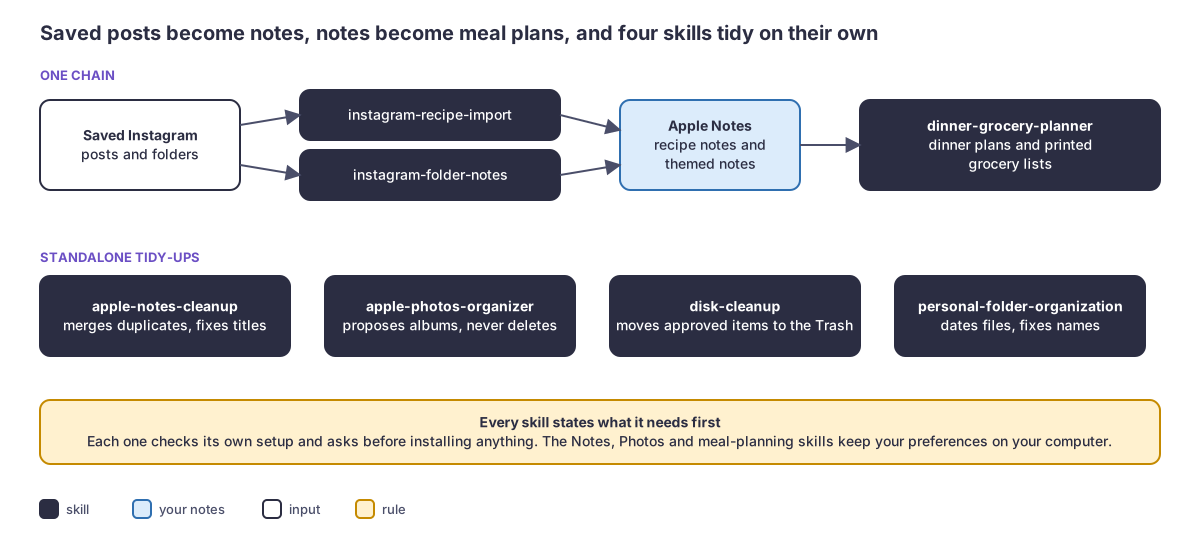
The Instagram skills turn saved content into useful reference material. Recipe posts become Apple Notes that the dinner planner can use to build weekly menus and grocery lists. Other saved posts become themed notes that are easy to search and revisit.
The Notes cleanup skill maintains the library, while the Photos organizer handles the separate photo collection. The folder and disk skills take care of the wider digital workspace.
Each skill has a defined area of responsibility, so information reaches the right place and is organized one way.
Shared principles
- Keep the originals safe. Important personal files are never casually deleted or overwritten
- Make changes reviewable. Organizing work starts with an audit and uses reversible steps wherever possible
- Respect personal preferences. Corrections and preferences are stored locally on my computer
- Keep things connected. Skills know which tool owns a particular type of information and hand it off accordingly
Stack
Claude Code skills, AppleScript, macOS permissions, Python, osxphotos, yt-dlp, ffmpeg, and whisper-cli.
Links
Source: private repository, available on request.